Showing posts with label audio. Show all posts

Tuesday, July 9, 2013

The Hardest Part of Making Games

I was playing Rock Band the other day. We dug the plastic instruments out of storage, and fired up the 360 to dust off our faux musician skills. And at one point, we played Nine Inch Nails's "The Hand That Feeds."

As the little, colored notes dropped off the screen, I found myself imagining how cool it must be to make music like that as a career. I love musical instruments, and to be surrounded by synths, sequencers, 1/4" audio cables, humming amps, electric guitars, and mixers would make my day.

I've dabbled in composition from time-to-time, and I've even had some relatively pleasing results. Sure, they're amateur at best, but creating them was fun. I actually long for the time when I'm simultaneously un-busy enough and motivated to get back into that.

That last thought brought me back from my daydream, even as the colored notes continued. "I'm too busy and too tired," I thought, "because I already have a cool day job like that." It was as sobering as it was uplifting.

In reality, Trent Reznor probably doesn't sit in his studio, admiring his collection. He doesn't sit with a cup of tea, trying out all the synth presets on his Korg M1. He doesn't feel the blissful absence of pressure as he surveys his laboratory.

Mr. Reznor has a business to attend to. He has music to compose, a brand to promote, investments to consider, and relationships to manage. What we picture him doing each day is blissfully ignorant of pressure.

What's So Hard About Making Games?

Like with music, I think there are many on the outside looking in at game developers. Each has their vision of what goes on in a developer's day, and some are more accurate than others. Some may picture developers coding away in the late night hours, illuminated by a cold monitor. Others might picture long conference tables, half-empty pizza boxes, and colored dry-erase diagrams.

Some people picture...other things.
So when it comes to game development in practice vs. imagination, what actually goes on? What are the types of work being done? Are any of them pure enjoyment? Tedium?

And what is the hardest part?

As with music, games are complex products, the creation of which involves a wide variety of tasks. How hard or enjoyable each of these tasks is will depend on the person(s), their abilities, and their preferences. It will also depend on the type of game being made, the tools being used, and the project constraints.

Since NEO Scavenger and Blue Bottle Games are primarily a solo project, I wear a pretty good number of hats. I do most of the dev work, content creation, business administration, and I've even collaborated with a few talented individuals.

What follows, then, is a review of the types of things I've had to do as part of developing NEO Scavenger and running Blue Bottle Games since it started. Along with each, I'll try to call out some of the more enjoyable, challenging, and tedious aspects of each.

If you're considering getting into game development, maybe this will help illustrate some of the rewards and challenges you'll face. And if you're already there, maybe it'll comfort you to know you're not alone :)
  • Game Ideas - It won't surprise you to learn that this is one of the easier, more enjoyable aspects of game development. I love coming up with ideas. I can't not do it, in fact. When I get up from bed to go to the bathroom at 3am, I have new ideas by the time I crawl back into bed. I have journals stacked in a drawer with ideas, a massive folder on my hard drive, another on Google Drive. When I bought my first Palm III, it was so I could jot down ideas as I rode the subway to work. I gave up a lucrative job at BioWare so I could make my ideas into games. I've been known to turn down perfectly good ideas in favor of coming up with ideas of my own. Have I mentioned I like coming up with video game ideas?

    While usually not tedious, there are a few times when it can be frustrating to come up with an idea. Usually, this is because one needs an idea for a specific problem, but none are coming. Ideas pour when they rain, but they're not always what you need when you need them. They're also notorious for derailing otherwise productive work with distraction.
  • Research - This one's a bit like ideas, above. I have to restrain myself from researching things if given the chance. Before I start drawing something, I research it. Writing about something? Research. Start building a new system? Research what other games do.

    Research can be tedious, of course. Plowing through an academic paper is rarely as instantly gratifying as Wikipedia. And many times, there are conflicting sources that need to be resolved. Vocabulary can also cause research effort to mushroom, as one is confronted with a wall of unfamiliar terminology.

    And then there's the question of research's value. Some of it is justifiable, as research can reveal useful strategies or opportunities. Most of the time, though, it's a guilty pleasure that gets in the way of real work. The challenge is often keeping that in check.
Not the hardest part of making games.
  • Pixel Art - Drawing game graphics is moderately hard work, but I enjoy it. It was harder and less enjoyable when I started, as the results were more frustrating. However, with practice, I'm getting better at producing the level of quality that I want, and I enjoy the process more. (The process grows faster, too.) The least enjoyable part of this job is when a piece requires other "infrastructure" art to help it.

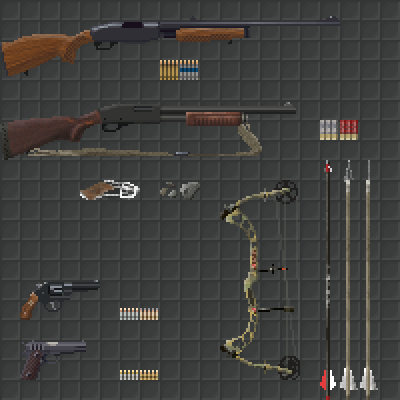
    For example, drawing a new rifle is lots of fun. Drawing that same rifle again and again, once for held, worn, and stored versions, and again for the combat UI, then all of the above again for the strapped version, again for the scoped version, and again for the strapped, scoped version? Tedious. I'd rather draw a new rifle. However, for it to work in the game, it needs all of its requisite art done, not just the fun part.
  • VFX - This one can be a lot of fun, but also very frustrating and complex. The cool thing about it is that subtle changes in code and art can make some really spectacular and interesting things happen. It's almost like a mini game development project within a larger project. (E.g. programming the flying, blinking lights in the Detroit map within NEO Scavenger, below).

    The hard part comes when the VFX requires complex algorithms, wrangling multiple coordinate spaces, or bypassing limitations in the platform (e.g. alpha blending that doesn't kill performance).


  • Audio Design, Recording - Audio work is something I am terribly amateur at, but still enjoy immensely. As hinted at in my musings about Trent Reznor, I'd love to sit down with some audio equipment and just noodle for days. And I've even afforded myself a few such days during the course of NEO Scavenger, field recording, cutting and looping effects, and even composing a title screen piece (mercifully replaced by Josh Culler's great soundtrack work).

    It's not fun all the time, though. Sometimes, it means listening carefully to hours of recorded audio for useful bits, cleaning them up, slice and package them, and labeling them with tags for reference later. And in the worst cases, it can be doing this process over and over until it sounds "right."

    Frankly, producing good audio is a full-time job of its own, and I haven't given it the love it deserves. It's beyond my capacity right now, as features and bugs eat the lions share of my development time. I still want to, it's just been back-burnered while fish are frying.
  • Programming - This is where a lot of time is spent. If I had to guess, this probably takes the largest share of my time. For just about everything I create in NEO Scavenger, some coding needs to be done to make it appear. Even coding sometimes requires more coding to work (i.e. bugs).

    As I approach the end of the project, that seems to be changing, though. Most of the early art/writing/design was for new systems that needed to be built. Now, I'm mostly filling in content variety in established categories, so the coding is shifting more towards maintenance and fixes.

    The difficulty and enjoyment in coding varies pretty wildly. Like with VFX above, coding can sometimes mean big changes from little code. This is also often the case when adding a design feature. At such times, coding is my favorite task.

    At other times, coding is a tedium that is hard to endure, or impossible to sort through. Rewriting the GUI for NEO Scavenger is one process that was agonizingly boring and involved. And some of the more complex problems can involve abstract and difficult thinking, especially when the system one is building is dependent on one or more systems that also haven't been built (or defined) yet.
  • Writing - Writing may actually trump artwork, in terms of time spent on tasks. NEO Scavenger is pretty heavy on text, so a lot of work goes into planning and creating that text.

    As with many tasks above, there is fun writing, and there is boring writing. The fun writing comes when my brain is in the right mode, and I have trouble keeping up with it. The story just seems to flow, and I always know what to write next (at least roughly).

    The tedious part of writing comes when one needs to handle all the peripheral infrastructure. In NEO Scavenger, players can take multiple paths in encounters, and that means those paths have to be written. The tedium is helped a bit by the fact that I try to make each path interesting. However, nothing helps that sinking feeling when I realize, "ugh, they might do that, and that means a whole new string or tree of encounters I need to conjure up."

    The hard part of writing is rather like what I described in programming, above. When so little has been defined, it might seem like one has lots of freedom. However, that freedom can be paralyzing, as one is constantly second-guessing whether the idea or character is plausible, interesting, or whether it might sabotage the story somehow down the line.
"...and the player will be able to choose ANY action they want!"

  • Game Design - Design is a bit hard to separate from the above, since it involves almost all of them. On a good day, it means recognizing clever ways of making two systems interact, producing a complexity greater than the sum of its parts. At times like these, one can almost enjoy their own game as if they're a new player, watching systems interact in surprising ways.

    On other days, there is a design problem that appears to have no good solution. I've spent days on some problems: thinking; starting down a path; recognizing a new issue; erasing; repeating. It can be very disheartening and frustrating. Sometimes, the problems with a new system don't emerge until all the work is done. Then, it becomes a trade-off between spending extensive time fixing, or extensive time rebuilding.

    And tedium can rear its head here, too. Some systems require reams of data entry and proofreading. Other times, navigating a web of interdependencies to ensure the systems don't undermine each other.
  • Build and Platform Management - This refers to the process of getting the game to run on the platform of choice, whether it be a browser, Windows, Mac, or Linux. It also refers to the process of getting that game into the hands of the person who needs it, be they oneself, a collaborator, or a customer.

    I'll admit, there's little here that I enjoy. I'm thankful for some of the experiences I've had in making NEO Scavenger cross-platform, but I wouldn't call the work enjoyable. Mostly, it's a mixture of tedious and challenging.

    The challenge is usually wrestling with the idiosyncrasies of each platform, be they resolution, user input devices, UI conventions, performance, or unexpected bugs. Flash helps with much of this, but as it turns out, causes almost as many problems.

    The tedium is usually the actual build process for me. Creating each of the platform builds requires a lot of PC-hopping, file uploading, changelog-writing, and form-filling.
They LOOK friendly enough...
  • PR - Interacting with press and public is a job in itself, and can take as much time as you offer. There will always be more conversations out there about your game than you can handle, so you have to set some limits to leave time for game development.

    Without a doubt, reading press and player feedback is my favorite part of PR. Praise can be highly motivating, as can constructive criticism. Even knowing that people are simply playing the game can raise one's confidence.

    I also enjoy learning about the art of promotion, and creating plans for publicity (e.g. special events, giveaways, strategic link placement, game festivals, etc.).

    I'm terrible at executing those plans, though. I hate asking people for things, so cold-calling press outlets is hard for me to do. I also have a hard time pulling the trigger on a PR event, knowing that "just one more" fix or feature would improve the first impression, perpetually delaying my plans.

    When it comes to customers, some interactions are easier than others. I love helping people, so if my response can offer something useful to the player, I feel good about it. Conversely, if I don't have anything helpful to offer the player, responding stresses me out.

    There are critics out there, but they're actually not as stressful as you might imagine. In cases where the criticism is valid and constructive, it's actually welcomed and helpful. And in cases where it's more insult than critique, it's easy to disregard.
  • Team Management - NEO Scavenger may be a solo endeavor, but I have had help along the way. And most of my experience prior to Blue Bottle Games was with large teams.

    At its best, teamwork is awesome. Being surrounded by talented, creative, and motivated people can make you do amazing things, and create stellar products. Some of my happiest moments (in any career) were when surrounded by a tight team of bright minds with a shared vision.

    Working with Josh on NEO Scavenger's music, and Cameron on NEO Scavenger's story and design, was equally inspiring. They could see things I missed, and offer ideas I never would have, helping to produce a fuller, more professional game experience.

    If there's any tedium I experienced, it was due to one major mistake I made: making myself the bottleneck. There's nothing more mitigating to a high-performance machine than forcing it to drive in rush-hour traffic, and that's what I did with Josh and Cameron. I never built the infrastructure for collaborators to contribute directly, and I wanted to own as much of the process as possible. As a result, I slowed down their progress. One could argue that I failed at one of the greater challenges of team management: delegation.

    Of course, there can also be bad teams. I've been on my share of those as well, and they can cause no end of tedium and frustration (for both the members and managers). Diverging goals and opinions, authority issues, poor communication, and lack of clarity can ruin even the best collections of talent. Bad teams are jobs in themselves, and making games becomes a side project compared to keeping things from melt-down.
  • Business Analysis - As with PR, this is an area I enjoy exploring quite a bit. And that came as a surprise to me.

    Learning about economics, business strategies, and entrepreneurship can be really addictive. I enjoy looking at the game I want to make, the market it's trying to reach, and hashing out features, pricing, sales channels, and partnerships to make it viable.

    Running the numbers can be tedious, of course. As can digesting info to keep one's picture of the market up-to-date. However, there's a certain Skinner-like reward to reading news about the industry, and suddenly recognizing an opportunity your product is poised to take advantage of. It's one of those rare moments in life when your "money-making idea" can actually do what it says on the tin.

    The hard part, here, is often just finding useful information. Nobody is in the business of writing "A Market Analysis Tailored for Dan Fedor." There's a lot of filling in blanks with educated guesses, extrapolating data, and in some cases, blind faith. Will your next game idea be a hit? Nobody knows. Even the AAA analysts are clueless here.
Let's not forget DIY desktop support.
  • Testing and Debugging - When folks say things like, "oh, you just play games all day?" this is probably of what they're thinking. And they're wrong.

    Just about everyone on a game dev team tests and debugs their work. Or at least, anyone worth their salt does. Fire up the game, navigate to the area where your recent work shows up, and start testing it.

    This can actually be a pretty fascinating area of work. It rewards good experimental method, note-taking, statistical analysis, and deduction. Sometimes, it can feel like forensics or detective work. And yes, once in a while, you get a chance to play through a section to see how it "feels."

    Unfortunately, this type of work can also require a lot of patience and persistence. It's not good enough that one tests entering combat and exiting again. One has to test cases where the player initiates combat with AI, AI with player, player with AI already in combat with AI, AI with player vs. AI. What if the player dies instead of leaving? The AI? What if one AI leaves and another stays? What if the player leaves, and more than one AI stays?

    There can be a combinatorial multitude of scenarios to test, and doing this job right means testing them all. Worse yet, once a change is made to the system, this entire suite of tests needs to be run again. And changes to the system are always happening.

    Some testing can be quite frustrating, too. A notorious example in NEO Scavenger are the null-pointer bugs that only show up later in a game session. They're frustrating because the cause is unclear, and one must play the game for long periods before the bug might appear. And often, the symptom of the bug varies from game-to-game, making it hard to tell if two bugs are related. If the bug cannot be caused reliably, and requires long periods of play to trigger, imagine trying to fix it. And worse, verifying that the fix works.
  • Project Management - In an ideal world, each developer could just release the game they want, when they want to. In reality, the pressures of time, budget, and manpower impinge on that ideal. Project management is the process of quantifying those needs and constraints, and finding the compromise that balances those forces best.

    A lot of folks picture project management as Gantt chartsscrum, status meetings, and spreadsheets. And a lot of project management involves those things.

    However, all of us do some amount of project management subconsciously when we assess the value of a new feature against our capabilities, schedule, and budget. Whether it's a customer asking for widescreen format support, or a teammate asking for alpha channels in their sprites, we're assessing cost vs. value somehow in our decision-making process.

    There is little that I enjoy about this process, honestly. Gathering data can be a lot of work, it often involves telling people "no," and the results are based on a lot of guesswork.

    That said, the process can reveal useful questions and concerns that are missed in more casual assessments. It can also serve as a common reference point for discussions among others. Even as a solo developer, it can be very helpful to have a to-do list that I can sort by effort, value, finished/unfinished, or other criteria.

    So, for me, it's one of those things I'm glad to have done, but dislike doing.
  • Taxes and Accounting - If you're running your own business, the CRA/IRS wants to know what you earn. And likely, you'll want to know as well.

    There is nothing enjoyable nor rewarding about doing taxes. It is 100% tedium and challenge, so I'll leave it at that.

    Accounting can be grueling, but the rewards are there if done right. It's important to know how one's business is performing, in order to make sound decisions. And it can sometimes be an ego boost if sales are good. But it's a lot of careful, detailed work, and it can involve some challenges of data-management and research.
More fun than taxes.
Some Additional Hard Parts About Making AAA Games

There are quite a few other areas that I could discuss, particularly from the point of view of a larger team. NEO Scavenger is a pretty small undertaking compared to AAA efforts, and I don't (yet) have to worry about such things as:
  • Animation - Either traditional or 3D rigging, keyframing, motion capture, and the like.
  • 3D Modeling - 3D models include characters, environment art, props, etc.
  • Materials - The development of textures, shaders, and other surface material properties for models.
  • Lighting - 3D worlds, and even some 2D worlds, require sources of light to be placed strategically.
  • Cinematics - Positioning cameras, moving them around, as well as managing the content being shown, settings for playback, and related work.
  • Localization - Translating the game for multiple markets.
  • Physics - Assigning volumes and physical properties to items in the game world.
  • Licensing - Negotiating permission to use licensed properties.
  • Other - And everything else I've forgotten about.
What is the Hardest Part About Making Games?

So what is the hardest part about making games? You may have noticed a pattern in the list above, having to do with the aspects which I find tedious or difficult. "God is in the detail," as they say, and this is as true in game development as any other field.

Dabbling in an art or science is fun, but due diligence is work. The hardest part of any task above is when I have to get my hands dirty and follow through with all the details. There's a reason organizations usually have a limited number of leaders with the broad-strokes vision, and an army of workers to do the detail work.

However, even the tasks listed above are manageable on their own. Many are measured in hours, days, or weeks, and not much worse than school assignments in that respect.

The hardest, in my opinion, is finishing a game. Spending hours each day, every day, consecutively for over two years. Waking up on day 520 of NEO Scavenger, and finding the motivation to do one more. That's the hard part. I like making games, but even I get tired of making the same game after all that time.

Don't mind if I do.
The hardest part of making a game is finishing it. For all the things I can do on my project, that's the one I still haven't.

Monday, January 7, 2013

2012 Retrospective

With the ringing of the new year, I thought it might make sense to look over the previous one, to get a sense of where I've been, and what that might imply about where I should go next.

January 2012

Twelve months ago, I was just becoming a Canadian permanent resident. After months of sitting on my hands, it was time to start making things official. I still had a lot left to do before launch, but I could finally submit paperwork and other requests, and start on the process of making my dream business a reality.

NEO Scavenger already looked pretty much like how it does today:
January 2012 vs. January 2013
However, despite the shared map and item graphics, quite a lot changed under the hood. These changes are only hinted at by some of the UI differences shown above.

NEO Scavenger finally got its logo:


And it also received an overhaul to its scavenging mechanic. Prior to 2012, scavenging involved visiting a hex, opening the inventory screen, and hoping there were items on the ground. Not exactly the most engaging mechanic, especially considering it was the namesake for the game.

Skill selection was finally becoming more like what we see now, instead of this:

Nominated for most intuitive UI of 2011.
The inventory screen was changed to rely less on ctrl and shift clicking, instead using "modes" triggered by visible buttons. The UI also got hotkeys for the various screens and modes.

I implemented Playtomic for metrics, which was a partial success. The basic stats are still useful, though the more complex stats I setup are not very usable. A preloader was added, which is still used today. SecureSWF is likewise still pulling its weight as a code obfuscator. And save/load was in its infancy.

January was also the month when I decided on NEO Scavenger's final business model. Until this point, I was expecting it to be launched under the sponsorship model. I also decided on feature voting, as a means to gather measured user feedback.

The game switched from 1280x800 (arbitrarily chosen as half my monitor's screen resolution) to a more universal 800x600 (palatable for game portals). Finally, I added site-locking as I prepared to put NEO Scavenger out there for people to test.

February 2012

In February, I began piecing together all the necessary components for launching a business on the web. Quite a bit of time was spent on everything from creating a website to setting up a payment provider. It was a month filled with more business work than game, though I still managed to cobble together some new in-game items, new artwork, and a spate of newspaper loot with back-story snippets to read.


March 2012

March marked the public launch of both NEO Scavenger and my company, Blue Bottle Games. 9 months after starting development, NEO Scavenger was available for all to try and pre-purchase.


And with that launch came the stresses of running a public-facing service company. I had to quickly adapt my schedule to balance development with PR, and adapt my psyche to the ups and downs of public opinion. Fortunately, most of that opinion was positive. But it was still a bracing experience.


March also marked my first taste of revenue. It started small, then surged wildly with some press coverage, then settled back down to a stream. Fortunately, that stream continues to this day, and even had a few additional, albeit smaller, spikes along the way.

April 2012

In April, sales settled into their steady state, which was (and continues to be) a little less than cost of living. This shrinking of a major launch spike caused some existential concern. As it turns out, this question of "when is it 'done'?" never goes away. It just changes circumstances and specifics over time.

I was also faced with my first major public game design decision: permadeath and save games. I ultimately decided to keep the game more rogue-like in that permadeath means save games are deleted. Months later, I'm glad I did. It was a decision which could have drastically altered NEO Scavenger, and I'm glad that it was altered in a way that keeps it challenging, unique, and with some later tweaking, fun.

I also started to formalize my PR policy by the time April came around. Fortunately, I wasn't faced with too much internet hate, but the hate I did receive forced me to grapple with my rules of engagement. Put succinctly, ignore attacks, and focus on being constructive and responsive to those that are constructive.


In development of the game itself, the camping and night/lighting features were big items. They were the first major features, in fact. Lots of loading/saving fixes were required as well. And the website and order process had some growing pains to resolve.

May 2012

During the month of May, blog posts focused on more meta-topics such as tracking data and money-saving tips, to keep overhead costs minimized.

Development of the game, on the other hand, was in full force. As I would soon discover, plot is hard to do. For nearly a month, all that readers saw coming down the wire was "did more plot work today." I don't enjoy phases where there's little to share with fans, but I also don't want to spoil the fun by revealing the story out of order.

Encounter Editor

Fortunately, there were a few updates sprinkled in to keep folks entertained. One such change was the chase, which opened up various new gameplay tools for tracking and hiding AI. The oft-requested pockets were also added.

And May is also when I started working with my first collaborator: Cameron Harris. His input to both design and plot has been a real asset, and I believe NEO Scavenger is a better game for it.

June 2012

I was on the road for part of June, so activity was a bit limited. It did give me a chance to try out developing on the road, and to see how poorly I was prepared.

Still, a lot got done on NEO Scavenger in June. In particular, I made my second major decision: to work on improving combat ahead of schedule. Combat was pretty poor in early versions of NEO Scavenger. Its dependence on luck made it more frustrating than fun.

New Combat UI
By the end of June, combat had a new face, and it was far more tactical and engaging. It also included some improvements to AI.

July 2012

In July, I started lamenting my poor work and exercise habits. While I feel my workaholism has improved (I took 2 weeks off at Christmas, despite the temptation to only take 1), I'm still short on exercise. I made my second, and more serious, dip into the world of business accounting. And I was approached by Desura for inclusion in their service!


With the new combat system launched, I began work on a wounding system that would integrate with the extant player conditions, and offer opportunities for resourcefulness and strategy in dealing with wounds. I would argue that this suite of combat and wounding systems was one of the more important changes to NEO Scavenger so far, as it greatly enhanced the game's uniqueness, depth, and fun factor.


July is also the month where I began working with my second collaborator, Josh Culler. Josh's music has added a wonderful sense of atmosphere to the game, and has been very effective in promotional trailers as well.

August 2012

August was the month of getting ready to launch NEO Scavenger on Desura. For the first time since March, the demo gets an update to reflect the new features and content. NEO Scavenger also got its first trailer. A lot of research goes into making NEO Scavenger downloadable.


With those fulfilments complete, I began the Desura application process. Coincidentally, Steam Greenlight launched that same month, and within 24 hours, NEO Scavenger was added to Greenlight!


NEO Scavenger also had combat fleshed out with new moves, terrain resources (e.g. water, wood), and a new encounter to allow players to return to the cryo facility and make a permanent base.

September 2012

With the Desura and Greenlight launches done, I decided to do a mini retrospective. In it, I look over some of the sales stats to-date, and how both launching on Desura and Greenlight affected them.


I also officially enter the Mac and Linux realm with my first Mac hardware. $500 netted me hardware I could create Mac binaries with, as well as dual-boot Linux for that version.


I also had a few hardware failures, which cost some time and money to isolate and fix, but were thankfully minimal in impact otherwise.

NEO Scavenger gets the ability to delete items, a new thank you postcard design, and work begins on random encounters. Josh's first batch of in-game music is also added.

October 2012

NEO Scavenger is featured in its first bundle. While a success by most standards, I decide that I'll probably wait until after v1.0 is done to do another, and turn down subsequent bundle offers accordingly.


Player frustration mounts, and the question of game design and permadeath resurfaces. I decide to take a long look at the game's design, to see where it might be failing. I still want to keep permadeath and NEO Scavenger's rogue-like qualities, but I also want to offer players the tools they need to overcome adversity. It is likely to be an ongoing balancing act.

The process of plot work remains slow and grueling, with little to show while in progress. However, I finally finish entering data for the random encounters. The Desura website gets the ability to connect owners there to accounts at bluebottlegames.com.

Work begins on one of the most deceptively difficult bugs in history: item stacking.

November 2012

With random encounters increasing the encounter node count above 750, the encounter editor fails to start anymore. I begin rebuilding the editor in Haxe NME, partially as a solution to the above performance issue, and partially as a test to see if NEO Scavenger is worth porting to NME. The results are pretty good, but there are a few stumbling blocks. I decide that NME holds promise, but I might wait a while before porting NEO Scavenger.


The stacking change continues to ripple bugs into mid-November, but finally works. The mouse is upgraded to take advantage of new Flash plugin features: hardware mouse and right clicking. Plot work resumes in the new editor.

DMC City Map v1
I also needed to take a step back to revise overall plot and mythology. And once course-corrections were in place, it was time to start work on opening the DMC to players. A lot of the work revolves around the map used to represent the city to players.

December 2012

As work continues on the DMC content, I focus the blog on more business related musings. I take some time to discuss my policy for customer relations, and how to avoid stressing out over release schedules.

Work on the DMC map continues, adding both detail and animated VFX for interest. Rather than releasing a full screenshot of it, I decide to do a teaser with one of Josh's new music pieces for the city.


I briefly start thinking about currency, then exercise some discipline and decide to focus on higher priorities: city encounters. Finally comfortable admitting the DMC will not be ready for Christmas, I decide to take a player's suggestion to release some wallpapers instead.

Desktop Wallpaper of DMC

Looking Back, and Looking Forward

It was a good year, overall. I had some good successes, made some mistakes, and learned some big lessons. NEO Scavenger earned more than I expected, but less than I hoped. It's poised for success, though, as long as I keep working hard.

The biggest issue I see, moving forward, is determining when to consider NEO Scavenger finished, and to move on to the next project. I'm resolved to release it this year, and have been telling myself and others that spring is the timeframe. Spanning that last stretch, and finishing with the right suite of features will be a big decision.

But as I go into 2013, I am more seasoned and confident, and I have optimism for the year to come. I'll no doubt make new mistakes, but also surmount new obstacles and claim new victories. Here's to acknowledging the past, and looking forward with hope!

Monday, November 7, 2011

There Goes the Neighbor- I Mean, Neighbourhood

Permanent Residency

Good news, everyone! I received a letter from CIC, and it appears they've made a decision! The letter was worded as dodgily as possible so as not to tip me off as to what that decision was, but indications point towards acceptance. I have a 1-hour appointment in a few weeks, and I am required to bring my documents and two government-approved photos. Trying not to get my hopes up too high, but after 11 months of waiting in the dark, it's good to have forward movement!

What does this mean for NEO Scavenger? Well, the short version is that with permanent residency, I can officially earn money. In a couple months, I should be able to incorporate, and license/sell NEO Scavenger without violating my visa.

The down side? Shiz just got real. I was sort of comfortably hiding behind my visa issues as an excuse to keep noodling with the game. After all, I couldn't do anything with it even if I finished it. But now, that excuse has an expiration date, and it looks like mid-January. So time to hunker down, take stock, and get this thing ready for market.

Audio Work

Almost as if I subconsciously knew time was running out, I decided to tackle audio in NEO Scavenger two weeks ago. I figured that was an area that had been neglected for too long, and probably one of the biggest missing features in the game, so I went at it.

As expected, audio is hard work! I managed to get mp3s playing in Flash/Flixel without too much trouble, but getting them to play and sound right is where things got difficult. As it turns out, mp3s don't loop well. For reasons I won't go into here, mp3s always have a silent gap at the beginning. And no amount of my workarounds were, ahem, working. I even went so far as sampling an mp3 stream's bits in real time to artificially cue past the gap each loop. Still an audible gap on loops.

The solution? Oddly enough, use Flash's IDE. I had been building everything in FlashDevelop, so I hadn't been using the IDE. Flash CS3/4/X does this thing where it bundles exported mp3s with information on the gap length at the beginning of the file, for seamless looping. Simply include the mp3s in an swc file at compile time, and voila! Seamless looping mp3s!

However, this meant one big change in the way I was loading assets...

Runtime Content and Piracy

Almost everything in the game, apart from the engine itself, is loaded dynamically at run time. I load images, game variables, the map, item definitions...you name it. "Why on Earth would you do that," you ask? Good question.

Originally, I thought I would be clever and avoid piracy issues this way. I had read Andy Moore's accounts of piracy and blacklisting, and I wanted to avoid the piracy issues he ran into. (Note that "piracy" here isn't the player getting the game without paying, since it's free anyway, but rather professional pirates decompiling the game, rebranding it as their own, and selling it to Flash portals for profit.)

I figured I could cleverly have my game ask my website for its guts on start-up. If the game was at a legit site, the game would get its guts. If not, or if the game was at a portal that blocked outgoing links, the game would probably default to demo content. Content which would only serve to whet one's appetite for the real deal. It was meant to be a sort of remote kill-switch, which would allow me to deny access if sites abused the game somehow (e.g. rebranded it without permission, or blocked links back to my site).

It sounded clever at the time. But there are some major drawbacks:

  1. Portals Like Single-File Games: Having a sprawl of files and web connections for a single game is a no-no in Flash game licensing. Particularly if the sponsor wants the game to be picked up by other portals, which multi-file games make difficult.
  2. Hosting Content: Having every instance of the game in the world ask my website for guts is a huge bandwidth and uptime concern. I could find a more reliable place to host the content, but even then, no portal owner wants to rely on a game that dies if I decide to stop hosting the files.
  3. Hurting Players: There's always the chance DRM hurts the player, and this would've been no exception. What if a problem causes the player's game to fail? And even working copies are going to have to rely on a centralized host to download data from, which could mean sluggish game loads for many users.
  4. Hypocrisy: I even promised myself I wouldn't use DRM. "Hello, I'm Dan from April 2011, remember me?"

So it seems pretty clear, the way forward: simplify. Just go with the game setup everyone else uses, to make accessibility as high as possible. Expect piracy, and try to use it to my advantage. I don't know what that means, yet. But it sure does sound good!

Meanwhile, Back In Actual Game Development

Notice anything new?

Attack modes!
That's right, new attack mode UI! I've changed the way attacks work in NEO Scavenger. Previously, anything you had equipped in an appropriate slot granted combat bonuses. This worked well enough when the only three weapons were bare hands, meat cleavers, and wrenches. Equipping two weapons simultaneously meant double bonuses. But that was ok, because we all have fantasies of marauding bandits in the wastelands with dual-wielded meat cleavers, don't we?

The problem came when I started adding ranged weapons. Suddenly, having a ranged weapon meant your bonuses from any other equipped melee weapon came along for the ride. While dual-wielding a hunting rifle and long-range throwing-cleavers sounds cool, it's sort of not what I intended.

Hence, attack modes. Now, every equipped weapon (when in the correct slot) grants one or more attack modes. They work kinda like Fallout or Silent Storm, in that you can see and change which attack mode is active via the graphic on the bottom of the screen.

The trusty old .308.
I also changed the UI a bit to accommodate the new attack modes. The message window is now thicker. It's an improvement in that the player can now see a bit more message history than before, but the down side is that it had to be hidden in the inventory screen to avoid obscuring important elements there. The sleep button was moved to the right, as it is an action and not a UI screen like the others. And I finally added a "Wait" action, for passing a turn without moving. I'm still on the fence about whether to use Rogue-like or Civ-like movements/turn, but for a Rogue-like method, a "wait" option is a necessity.

I also rewrote the visibility code to be faster and more reliable. You can especially see it in the first image, above. The player's line of sight gets blocked by certain hex types, even when on an elevated tile like the hill. What I had before worked, but wasted a lot of CPU on redundant hex calculations, and still made a few errors.

Since I wanted creatures to use ranged weapons, I needed visibility calculations to be cheaper. Otherwise, the AI would take too much time during a turn. And without visibility checks, creatures might attack the player from unfair locations (e.g. through a hill).

And since creatures and players were now sharing so much code, I finally took the plunge and made them both derive from a common class. (Yes, I know, they should've from the start. Bad Dan!) As you can see in the above two screenshots, now everybody knows when Dogman is comfortable. (Still working on message filtering)

One-Click Inventory

One last big change is to the inventory system. (Yes, again.) Enough testers have complained about dragging items around that I finally made auto-moving the default click behavior. Anything you so much as touch with a mouse click or drag pops automatically into an appropriate slot, if possible. Ground items go to inventory. Inventory goes to ground. Available skills go to player skills, and vice versa.

Everything you see here took one mouse click to equip/pick-up.
If the player wants to be more specific about where an item goes, they now must shift+drag. This is also true if the player wants to Tetris-rotate an item to fit.

In hindsight, it makes more sense this way. 90% of the time, users are picking up items and dropping them, and this saves the user the trouble of tedious clicking or dragging.

Next up: figuring out how to handle ammo, and making encounters and skills more intuitive. I should probably do another content pass soon, too. The skeletal story encounters need some clean-up and fleshing-out to be worth their weight.

Friday, July 8, 2011

Inventory and Maps

Well, our trip to Eureka was a success. We had a good number of nights by the fire, a few days out on the boat at the lake, and tons of fireworks! I was a dork for not bringing my audio recorder, as the wilderness noises out there would've been handy to have. The crickets sound different, there were crackling campfires, and even distant elk grunts. And the semicircle of campers were a bit of inspiration for post-apocalyptic makeshift communities (though way more luxurious).

Back on the homefront, I managed to squeeze quite a bit of work into NEO Scavenger in the limited workdays since the 30th.

Inventory Screen
When we last left the inventory screen, one could see equipped items in the various slots by pressing "I" on the keyboard. Clicking on the arrows at the center of the screen allowed the player to toggle which equipment slot was displayed on each half of the screen.

Fast forward a few workdays, and here's what we have:
Inventory screen showing local hex items and a plastic bag in the player's right hand.
One of the new features in the inventory screen is a category for showing the items on the ground in this hex. This is probably going to expand to include items the player scavenges for, but for now, it shows randomly generated loot. Each hex has a probability for finding certain items, and in this case, we found a few cans of soup. I noticed I was constantly opening the ground contents as I moved around the map, so I made that category open by default when the screen opens.

The right side of the screen is showing the player's right hand slot, which currently has a plastic shopping bag equipped. Equipping an item is just a matter of dragging the item over an empty slot graphic for a category, like so:

Equipping a plastic bag in the right hand.

If an equipped item can act as a container, they will have a dark box below them, representing their storage space. The ground always has available storage space, and the bag has room for about 6 cans of soup.

The idea is that items will have differing sizes, and differing storage box sizes, to limit to how many items one can fit in a container. Items cannot overlap in a container, so the player must arrange the items via drag and drop to fit if they want to maximize carrying capacity.

Containers that are moved around maintain their contents, and can contain other containers. To avoid infinite nested containers, I want to make containers use at least as much storage space as they provide.


To make life a bit easier for the user, I added a few helpers to the inventory screen. First of all, the drag and drop highlights the object to let the user know if it will fit here or not. Red means it won't fit in it's current position, blue means it will. I also added a snapping/padding algorithm to be a bit more forgiving on the player, so placement doesn't have to be pixel perfect. The game will just snap an item to the nearest space where it will fit, within a certain threshold.


Dragging the can to a location it won't fit (left) vs. a place it will (right).
I also added doubleclick support to the items, so the user can just doubleclick an item to move it. The behavior right now tries to move the item from it's current side of the screen to the opposite side's slot or container, if available. If it can fit, it finds the first available space and puts it there (preferring the equipment slot if empty, otherwise the storage space). If it cannot fit, it does nothing. I thought this would be important because constant mousing across the screen can be tiring, and I always appreciated it when games like Fallout allowed for doubleclick transfers of items. I will likely add a "transfer all" mechanism in there too.
I'm still not sold on the UI for the categories, but I haven't figured out an improvement yet. I did toy with the idea of a human body as a category selector, but haven't hooked it up yet.

Human silhouette as selector for equipment slots.
I'm not sure this makes it much easier to use, though it might slightly improve user recognition of slots. It'll require more testing and experimenting.

Eating and Time Passage
I also made a slight change to the game after trying out the scavenging of soup cans. Originally, a turn lasted 4 hours, and the player could move 4 spaces per turn (barring hills or forests). With this timescale, I was getting hot/cold/hungry very quickly, and hardly had time to deal with it. Also, the player character ate whatever he had on hand automatically when he became hungry. Overall, this left me feeling a bit overwhelmed by the amount of "surviving" I had to do each turn, not to mention the rapid day/night/weather changes.

So I decided to change the turn length to 1 hour, and make eating a manual task. Now, weather changes less drastically per-turn, and the player can choose when to eat vs. ration. And health conditions take longer to set in, allowing for more exploration time between crises.

So far, I like the new pacing. After tinkering around with it a bit, it felt more like a game than before. One thing which did seem to work as-designed was the overheating mechanic. My character was starting to suffer from heat exhaustion, and it started raining. Immediately, the player returned to normal. And on another occasion, I was able to postpone heat exhaustion by taking off his t-shirt. A few times, I died of heat exhaustion as well, in sustained 105F+ temperatures.


Maps!
Up until now, the game has used perlin noise to generate smallish (36x72) hex maps. Anything larger tended to bog down the game and ultimately crash due to timeout. Since I wanted to stage my game in a post-apocalyptic Michigan, I needed a way to edit maps. So I decided to repurpose my random-image code to support loading a hand-painted map of Michigan.

Michigan, in 422x489 pixel, 6-color glory.
The map is 422x489 pixels, with one pixel corresponding to a hex. Each color is a different terrain type. It lacks a lot of the features I would like to add, but has enough to equal the random maps I've been using.

But first, some optimization was in order. As said before, I was having trouble much above the realm of 70x30 pixels. There was no way 400x500 would fly as-is. So I broke up my map-parsing into manageable chunks, and called a chunk each game cycle until it was done. Then, I dispatched an event to signal the game-start code. This, along with a few bug fixes it revealed, allowed me to load much larger maps.

Second, my map needed some special treatment. Careful readers will note that hex maps have every other row offset by half a column width, so using a square-grid bitmap to define a hex map may cause weirdness. Well, it did. My rivers looked like stitches in-game, with land bridges every other column. Turns out, I had to paint my rivers using a 1x2 pixel brush, rather than 1x1, to avoid broken rivers in-game.

The outcome was actually kinda fun to play with. For the first time, I could pick out where I was in the world by features, and sort of knew my way around. And the vast distances allowed me to tinker with the eating and overheating mechanics a bit more.

Still to come, per-hex shelter from the heat, additional types of items to pick-up, new hex features like ruins. This next week may be a nice artistic breather from the code work I've been up to lately. Till next time!

Thursday, June 16, 2011

Phil, Henry, I believe I owe each of you a beer

Beer #1: FlashDevelop


First of all, to Phil, for tipping me off about FlashDevelop. After using CS4's IDE for a few generations, FD is a serious breath of fresh air. Code completion, context tool-tips, actual real-time debugging and watching of variables...it's like AS3 grew out of it's awkward high school living arrangement in CS IDE's basement, got a job, and moved into a swanky flat. I haven't even cracked some of the auxiliary features such as tasks/todo, refactoring, and source-control. It's just flat-out awesome, and I think my development is going to kick into high gear as a result. Thanks Phil!

Beer #2: flixel

And to Henry, a beer for recommending flixel. Right off the bat, flixel showed itself to be so much of what a new game needs to get off the ground quickly. Built-in libraries for sprite blitting, tilemaps, game objects, game states, on-screen text, button handling, physics, audio, you name it. It's a fantastic package to work with, and I've used a lot of game libraries, from Allegro back in the day, to Torque, Axiom, XNA, and Ogre.

The real question was, would it work as NEO Scavenger's top-down, hex-map-based engine? I was dubious for the first two days. Trying to make the map myself, using FlxGroups and FlxSprites, produced performance below that of vanilla Flash. However, yesterday, I think I achieved a breakthrough. After subclassing FlxTilemap and family to support hex-based maps, performance improved drastically. I still have some work to do, before it completely replicates the map functionality I had before, but it's looking promising.

Regardless of how that turns out, flixel will at least be extremely valuable in some future games I've jotted down in my backlog, so thanks Henry!

In Other News
Indie life in the mountains continues to go well. I've been chugging away with my aforementioned two new favorite tools. I get the occasional rainstorm, bird calls, or coyote howl to add to my audio library. I've started some work on a new style of hex art I want to try. And I even got some hands-on time with my PC's guts, replacing a dying exhaust fan. Good times!

Thursday, June 9, 2011

Oh Sweet Internet

The Shaw guy just hooked us up. After a week and a half on the road, we're once again plugged-in and reaching out. And how wonderful it is. We're bathing in the warmth of information on-demand now.

Cellphone coverage is still an issue, and we may need new phones to work with the non-Rogers towers in our area. At the moment, our Montreal number still works, but I have to kneel by the dining room window to get a signal.

Seriously. Only if I kneel.

Which I guess is fair, given this is our front yard:


It's about a 30 minute drive into town, so we're pretty out there. But it's gorgeous. And ripe with wilderness-y sounds for my game!

There are some minor moving in tasks left to do. Some pictures to hang. Some miscellaneous items to find homes for. But we're just about unpacked now, and game development should resume no later than Monday. See you then!

Friday, May 13, 2011

Indie Life, Fog of War, and Databases

Indie Life
So, work continues on the prototype. Both the past two days were structured pretty much like the first. Morning block, then lunch, then afternoon block, then 1 hour break, then evening block. I end up finishing about the same time I did at BioWare, since the extra break replaces my old commuting time.

I also make it a point to try and get up about once per hour. I've read ergonomic material suggesting that was a minimum to aim at for healthy workplace habits. I've also noticed that standing/walking around tends to jog my brain back into action, especially when I get stumped during a long sitting spell.

Coincidentally, weasello recently tweeted a timelapse of himself at work, where he does just that! When I asked him about it, he said it was inadvertent. But he also pointed out a long shower is the perfect solution to a paralyzing mental block. I totally agree!

Fog of War
I've get fog of war working pretty much the way I want it to now. It works a lot like the Civ 5 model, where the player can see a certain range, and some tiles block line of sight. Hills increase visual range over everything except other hills, and mountains block everything.

At first, I thought Civ had a more complex elevation-based line of sight model. I was delighted when I discovered some XML settings which suggested a simpler (albeit more clever) design. Here's a screenshot of it at work:


In the screenshot, you can see the player standing at the edge of a forest. His visual range is 2 hexes across the plains. But the tree hexes block that vision, limiting it to 1 hex instead. Lastly, the dimmed forest hexes in the northeast show areas the player had previously explored but which are now out of visual range. Careful observers will note the player had a 1-hex visual range while travelling through the forest. Also, they'll notice the awesome programmer art I've used in the hexes!

Databases
One of the tasks I earmarked as higher priority was to get my game using data-driven design asap. I got a certain way into the code just using variables set at the headers of .as files, but that won't scale well. And I'm getting to the point where I need to save data between sessions anyway.

Rather than spend time researching how to get Flash to parse data from text files, and write back to them, I decided to use that time to research databases and Flash. I'll have to do it someday, might as well do it now.

So Wednesday was mostly spent getting the environment setup on my home PC. In order of installation, that includes Apache, PHP, MySQL, and phpMyAdmin. On Windows 7, it was mostly straightforward. The one gotcha turned out to be Win7's Program Files (x86) folder and Apache. It took me a little over an hour to figure out why the config changes I was making wouldn't stick. Turns out, Win7 protects files in that (x86) folder in a funny way. It warns me I need admin rights when I try to change a file in that folder, which I am given the option to temporarily grant myself. Then, it saves my changes.

Or so I thought. When I open the config file I edited, I see my changes. Plain as day. But when I restart Apache, no changes. And here's the weird part: make a copy of that config file, and the copy has no changes. Open the original file, changes are there. Wha?

On a hunch, I copied the file outside of (x86) and made my changes there, then copied back into (x86). And it worked! I still don't know what mechanism Win7 used to simultaneously protect that file, but trick me into thinking I had changed it. And I don't have the patience to dig further right now. Maybe I'll untangle that ball some other day.

The rest of the day was spent building a working knowledge of MySQL queries, database design, and PHP interaction with MySQL. At the end, I had build myself a PHP script which reliably created the tables I'd need to store map data. Next step: get that data saving and loading from Flash!

Audio
Oh, I also got a few more samples recorded. For one thing, this awesome vehicle with a shovel and tank treads showed up! Yay screeching tread noises! And I managed to get some ambient park noises to boot. Critters, distant car horns, and the murmur of city all around. Oh! And late-night recordings of cars passing over steel plates in the road.

Ok, off to MySQL land!

Tuesday, May 10, 2011

Day One as an Indie

Monday was my first full-time day as an indie. My original plan was to spend the first half of it coding, and the latter half doing smaller non-coding tasks. As it turned out, I spent over 80% of the day coding, and forced myself to stop late in the day to do some audio work. Got started about 9:30am, took an hour for lunch, went from 1-4, took a break to help Rochelle with grocery shopping, then spent another 5:15-6:45 stint before calling it quits. I'll give that schedule a few more tries, and tweak it as necessary.

Coding
The coding was largely spent on hex grid fog of war algorithms, with some quick-and-dirty perlin noise terrain generation to boot. I also spent a little time untangling some messy relative coordinate spaces I had created. Overall, Flash AS3 is still about the easiest game prototyping framework I've used yet, even though I loved C# and XNA. It can be arbitrary, and the IDE is a bit rough, but the support community is great, and most of the libraries I need to do stuff are already there and just work so I can focus on game logic.


Note: You can see an old top-down player sprite I created here as well. Yes, he is wearing a browncoat ;-)

Audio
The audio work included my first field test using my Zoom H1 audio recorder, at zero cost to development time. Hydro Quebec is doing some serious roadwork on our street this week. Since my office window faces the street, I was able to plop the recorder out on the sill, shut the window, and get about 1 hour of road work noise as I was doing other things. I have a lot to learn, of course, but it was fun picking diesel sounds, yelling laborers, and jackhammers out of the stream for use later. A little too much idle deisel noise to make most of it useful, though.


Day 1 - Conclusion
So far, so good. I was highly motivated all day. I had a few stumbling blocks where I couldn't bring my mind to bear on tricky problems, but I think that was largely due to needing to step away sooner and clear my head. I think I'll need more mini-breaks, where I get off my ass and walk around. I've found that worked very well for me in the past, but I need some time to work out excuses to stand up and stretch for a few minutes in this new work environment. I should also be more willing to switch gears and do art, audio, music, marketing, or business planning when the coding part of my brain needs a rest. And I'm really digging the feeling I can get right back in there today and follow-up on the stuff I did yesterday. It feels good to finally be making tangible progress on my dream!