Showing posts with label design. Show all posts

Tuesday, August 13, 2013

Training to be a Game Developer

Recently, I posted a massive brain-dump on /r/gamedev, in an effort to further disseminate some of the info I've collected here. The results were very positive, and I'm thrilled that so many people found useful topics to peruse.

One question came up, however, which involved an underrepresented topic on my blog: training. Further, another developer pointed out that most of my advice was more applicable to folks who already had skills and experience in game development.

With that in mind, I thought I might share some of my experience on training and skills in game development, both as an indie and a former decision-maker in hiring at BioWare.

How to Become a Skilled Game Developer: The TL;DR Version

If I were to summarize this post in one statement, it would be this:
Learn and practice your chosen craft full-time for 5 years.
There. That's it. That's all you have to do. Figure out what it is you want to do as an indie or game industry employee, and start learning and practicing the craft full-time. That means 8 hours per day, 5 days per week, taking time for holidays and vacation. Do that earnestly, and you'll be a skilled game-maker and master of your chosen craft in about roughly five years.

Already have a job? Cut the hours per day down, and add an appropriate number of years. E.g. 4 hours per day instead of 8 with 10 years instead of 5, or similar.

What About School?

That's a good question. What about school?

Consider [the way we define] a master's degree. In much of the world, a master's degree represents professional-level mastery in a practice or field of study. It is typically about 2 years of advanced study after completing a 4 year bachelor's program.

According to the ECTS standard, that equates to roughly 1500-1800 hours of study per year, over 6 years. By comparison, one year of full-time work represents roughly 2000 hours.

Masters program = 6 years * (1500 to 1800 hours per year) = 9000 to 10,800 hours.
5 years full-time = 5 years * (2000 hours per year) = 10,000 hours.

As an aside, Malcom Gladwell has written an interesting book about several of the world's great success stories. One thing many have in common? 10,000 hours or more of diligent work in their field. It's not the only thing that got them there, mind you, but I tend to agree with him that it's an important component.

Is School Better Than Self-Training?

That's hard to say, really.

On one hand, an accredited degree program includes much more than simply study of related topics. It includes experience with different learning methods, socializing in different settings, learning to be independent of one's family, access to contacts in academia and industry (including valuable experts, a.k.a. professors), and access to facilities that would often be beyond the reach of a single person.

On the other hand, school isn't always the wise investment it used to be. With tuition rapidly outpacing housing costs, and free educational resources abundant all around us, one could probably have an equal (and sometimes, better) self-directed education.

Some Degrees Are Better Than Others

If you do choose to attend university, carefully consider the program you're following. Some degrees carry more weight, and are more valuable in the world, than others. The same goes for institutions.

When I was a hiring manager at BioWare, I looked at a lot of resumes and portfolios. I not only made decisions on hiring for my own team, I sat in as an advisor on decisions for other teams. When deciding on which applicants to invite for an interview, we looked at three things:
  1. Their work experience.
  2. Their portfolio.
  3. Their schooling.
Numbers 1 and 2 were, by far, the biggest factor across all hires. We wanted to see what you've done, and if that level of quality was high enough that we wanted you on the team. A killer portfolio of work (art, mods, tech demos, etc.) would almost guarantee an interview. Similarly, a significant role on an awesome game or team would get our attention.

In the absence of those two (or sometimes, despite them), school could sometimes tip the balance. Seeing a programmer graduate of University of Waterloo or MIT, or an art student from Sheridan would usually be a worth a second look.

However, unless the school was reputable as a consistent, quality source of students in the given field, it rarely did more than tell us the applicant had enough diligence and social grace to graduate. Important skills, no doubt, but not exclusively learned in a university, and not enough on their own to warrant an interview.

Work Hard, No Matter Which Path You Choose

One thing is certain, though, and that is discipline matters. Whether you enroll in an university program, or decide to teach yourself, take it seriously and work your ass off. Kicking your own ass to learn as much as possible, and putting that into practice, will put you head and shoulders above the sea of applicants around you.

Whether watching online courses and practicing your craft, or sitting in lecture halls and doing homework, the amount of effort you put into your education will matter more than where/if you enroll.

Be Well-Rounded

One thing to be careful of, whether studying in an accredited program or on your own, is to be well-rounded in your curriculum. Skill in your craft is important, but fairly useless if you can't relate it to the rest of the world.

Learn a bit about history, psychology, art, science, writing, and anything else you can manage. Learn the scientific method and quantitative analysis. Learn objectivity, various problem-solving methods, how to brainstorm effectively, and how to find info that you need.

And please, for the love of all that is holy, learn how to work well with others. In fact, make this your top priority. I can tell you with 100% certainty that if you are a douche, your career will be short and painful. You could be brilliant, a virtuoso, or a damned modern-day Leonardo DaVinci. But if you're also a douche, you're out. (Unless you're a rich-enough douche to call the shots, in which case your career will be longer, but probably still painful.)

Also, a note of caution: some crafts are less employable than others outside the game industry. If you can't think of another industry using your skills besides games, you may want to consider making said craft secondary in your studies. Look for complementary, more in-demand areas to study, and use that as a way into games. You can still specialize in your preferred craft, but you'll have a broader skill to fall back on.

As an example, I know quite a few game designers who were programmers or quality assurance before they became designers. In contrast, I know very few designers who started out in the industry as a designer. As another example, most of the tech artists I worked with came from programming or art backgrounds. None of them came from a "tech art" degree program.

What Did I Do?

So how did I get into the game industry? A little bit of everything above, amounting to a mainstream education mixed with lots of self-training in my spare time.

I started describing that process here, but it was quickly turning into a story of its own. So with that in mind, maybe it's best saved for a separate post.

Stay tuned for part two!

Tuesday, July 9, 2013

The Hardest Part of Making Games

I was playing Rock Band the other day. We dug the plastic instruments out of storage, and fired up the 360 to dust off our faux musician skills. And at one point, we played Nine Inch Nails's "The Hand That Feeds."

As the little, colored notes dropped off the screen, I found myself imagining how cool it must be to make music like that as a career. I love musical instruments, and to be surrounded by synths, sequencers, 1/4" audio cables, humming amps, electric guitars, and mixers would make my day.

I've dabbled in composition from time-to-time, and I've even had some relatively pleasing results. Sure, they're amateur at best, but creating them was fun. I actually long for the time when I'm simultaneously un-busy enough and motivated to get back into that.

That last thought brought me back from my daydream, even as the colored notes continued. "I'm too busy and too tired," I thought, "because I already have a cool day job like that." It was as sobering as it was uplifting.

In reality, Trent Reznor probably doesn't sit in his studio, admiring his collection. He doesn't sit with a cup of tea, trying out all the synth presets on his Korg M1. He doesn't feel the blissful absence of pressure as he surveys his laboratory.

Mr. Reznor has a business to attend to. He has music to compose, a brand to promote, investments to consider, and relationships to manage. What we picture him doing each day is blissfully ignorant of pressure.

What's So Hard About Making Games?

Like with music, I think there are many on the outside looking in at game developers. Each has their vision of what goes on in a developer's day, and some are more accurate than others. Some may picture developers coding away in the late night hours, illuminated by a cold monitor. Others might picture long conference tables, half-empty pizza boxes, and colored dry-erase diagrams.

Some people picture...other things.
So when it comes to game development in practice vs. imagination, what actually goes on? What are the types of work being done? Are any of them pure enjoyment? Tedium?

And what is the hardest part?

As with music, games are complex products, the creation of which involves a wide variety of tasks. How hard or enjoyable each of these tasks is will depend on the person(s), their abilities, and their preferences. It will also depend on the type of game being made, the tools being used, and the project constraints.

Since NEO Scavenger and Blue Bottle Games are primarily a solo project, I wear a pretty good number of hats. I do most of the dev work, content creation, business administration, and I've even collaborated with a few talented individuals.

What follows, then, is a review of the types of things I've had to do as part of developing NEO Scavenger and running Blue Bottle Games since it started. Along with each, I'll try to call out some of the more enjoyable, challenging, and tedious aspects of each.

If you're considering getting into game development, maybe this will help illustrate some of the rewards and challenges you'll face. And if you're already there, maybe it'll comfort you to know you're not alone :)
  • Game Ideas - It won't surprise you to learn that this is one of the easier, more enjoyable aspects of game development. I love coming up with ideas. I can't not do it, in fact. When I get up from bed to go to the bathroom at 3am, I have new ideas by the time I crawl back into bed. I have journals stacked in a drawer with ideas, a massive folder on my hard drive, another on Google Drive. When I bought my first Palm III, it was so I could jot down ideas as I rode the subway to work. I gave up a lucrative job at BioWare so I could make my ideas into games. I've been known to turn down perfectly good ideas in favor of coming up with ideas of my own. Have I mentioned I like coming up with video game ideas?

    While usually not tedious, there are a few times when it can be frustrating to come up with an idea. Usually, this is because one needs an idea for a specific problem, but none are coming. Ideas pour when they rain, but they're not always what you need when you need them. They're also notorious for derailing otherwise productive work with distraction.
  • Research - This one's a bit like ideas, above. I have to restrain myself from researching things if given the chance. Before I start drawing something, I research it. Writing about something? Research. Start building a new system? Research what other games do.

    Research can be tedious, of course. Plowing through an academic paper is rarely as instantly gratifying as Wikipedia. And many times, there are conflicting sources that need to be resolved. Vocabulary can also cause research effort to mushroom, as one is confronted with a wall of unfamiliar terminology.

    And then there's the question of research's value. Some of it is justifiable, as research can reveal useful strategies or opportunities. Most of the time, though, it's a guilty pleasure that gets in the way of real work. The challenge is often keeping that in check.
Not the hardest part of making games.
  • Pixel Art - Drawing game graphics is moderately hard work, but I enjoy it. It was harder and less enjoyable when I started, as the results were more frustrating. However, with practice, I'm getting better at producing the level of quality that I want, and I enjoy the process more. (The process grows faster, too.) The least enjoyable part of this job is when a piece requires other "infrastructure" art to help it.

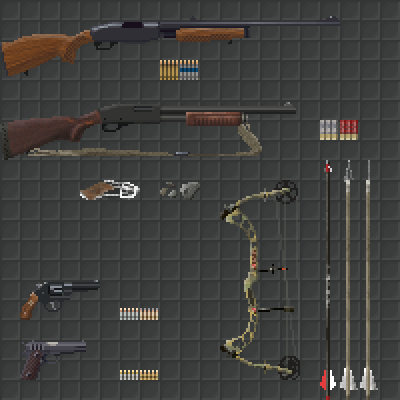
    For example, drawing a new rifle is lots of fun. Drawing that same rifle again and again, once for held, worn, and stored versions, and again for the combat UI, then all of the above again for the strapped version, again for the scoped version, and again for the strapped, scoped version? Tedious. I'd rather draw a new rifle. However, for it to work in the game, it needs all of its requisite art done, not just the fun part.
  • VFX - This one can be a lot of fun, but also very frustrating and complex. The cool thing about it is that subtle changes in code and art can make some really spectacular and interesting things happen. It's almost like a mini game development project within a larger project. (E.g. programming the flying, blinking lights in the Detroit map within NEO Scavenger, below).

    The hard part comes when the VFX requires complex algorithms, wrangling multiple coordinate spaces, or bypassing limitations in the platform (e.g. alpha blending that doesn't kill performance).


  • Audio Design, Recording - Audio work is something I am terribly amateur at, but still enjoy immensely. As hinted at in my musings about Trent Reznor, I'd love to sit down with some audio equipment and just noodle for days. And I've even afforded myself a few such days during the course of NEO Scavenger, field recording, cutting and looping effects, and even composing a title screen piece (mercifully replaced by Josh Culler's great soundtrack work).

    It's not fun all the time, though. Sometimes, it means listening carefully to hours of recorded audio for useful bits, cleaning them up, slice and package them, and labeling them with tags for reference later. And in the worst cases, it can be doing this process over and over until it sounds "right."

    Frankly, producing good audio is a full-time job of its own, and I haven't given it the love it deserves. It's beyond my capacity right now, as features and bugs eat the lions share of my development time. I still want to, it's just been back-burnered while fish are frying.
  • Programming - This is where a lot of time is spent. If I had to guess, this probably takes the largest share of my time. For just about everything I create in NEO Scavenger, some coding needs to be done to make it appear. Even coding sometimes requires more coding to work (i.e. bugs).

    As I approach the end of the project, that seems to be changing, though. Most of the early art/writing/design was for new systems that needed to be built. Now, I'm mostly filling in content variety in established categories, so the coding is shifting more towards maintenance and fixes.

    The difficulty and enjoyment in coding varies pretty wildly. Like with VFX above, coding can sometimes mean big changes from little code. This is also often the case when adding a design feature. At such times, coding is my favorite task.

    At other times, coding is a tedium that is hard to endure, or impossible to sort through. Rewriting the GUI for NEO Scavenger is one process that was agonizingly boring and involved. And some of the more complex problems can involve abstract and difficult thinking, especially when the system one is building is dependent on one or more systems that also haven't been built (or defined) yet.
  • Writing - Writing may actually trump artwork, in terms of time spent on tasks. NEO Scavenger is pretty heavy on text, so a lot of work goes into planning and creating that text.

    As with many tasks above, there is fun writing, and there is boring writing. The fun writing comes when my brain is in the right mode, and I have trouble keeping up with it. The story just seems to flow, and I always know what to write next (at least roughly).

    The tedious part of writing comes when one needs to handle all the peripheral infrastructure. In NEO Scavenger, players can take multiple paths in encounters, and that means those paths have to be written. The tedium is helped a bit by the fact that I try to make each path interesting. However, nothing helps that sinking feeling when I realize, "ugh, they might do that, and that means a whole new string or tree of encounters I need to conjure up."

    The hard part of writing is rather like what I described in programming, above. When so little has been defined, it might seem like one has lots of freedom. However, that freedom can be paralyzing, as one is constantly second-guessing whether the idea or character is plausible, interesting, or whether it might sabotage the story somehow down the line.
"...and the player will be able to choose ANY action they want!"

  • Game Design - Design is a bit hard to separate from the above, since it involves almost all of them. On a good day, it means recognizing clever ways of making two systems interact, producing a complexity greater than the sum of its parts. At times like these, one can almost enjoy their own game as if they're a new player, watching systems interact in surprising ways.

    On other days, there is a design problem that appears to have no good solution. I've spent days on some problems: thinking; starting down a path; recognizing a new issue; erasing; repeating. It can be very disheartening and frustrating. Sometimes, the problems with a new system don't emerge until all the work is done. Then, it becomes a trade-off between spending extensive time fixing, or extensive time rebuilding.

    And tedium can rear its head here, too. Some systems require reams of data entry and proofreading. Other times, navigating a web of interdependencies to ensure the systems don't undermine each other.
  • Build and Platform Management - This refers to the process of getting the game to run on the platform of choice, whether it be a browser, Windows, Mac, or Linux. It also refers to the process of getting that game into the hands of the person who needs it, be they oneself, a collaborator, or a customer.

    I'll admit, there's little here that I enjoy. I'm thankful for some of the experiences I've had in making NEO Scavenger cross-platform, but I wouldn't call the work enjoyable. Mostly, it's a mixture of tedious and challenging.

    The challenge is usually wrestling with the idiosyncrasies of each platform, be they resolution, user input devices, UI conventions, performance, or unexpected bugs. Flash helps with much of this, but as it turns out, causes almost as many problems.

    The tedium is usually the actual build process for me. Creating each of the platform builds requires a lot of PC-hopping, file uploading, changelog-writing, and form-filling.
They LOOK friendly enough...
  • PR - Interacting with press and public is a job in itself, and can take as much time as you offer. There will always be more conversations out there about your game than you can handle, so you have to set some limits to leave time for game development.

    Without a doubt, reading press and player feedback is my favorite part of PR. Praise can be highly motivating, as can constructive criticism. Even knowing that people are simply playing the game can raise one's confidence.

    I also enjoy learning about the art of promotion, and creating plans for publicity (e.g. special events, giveaways, strategic link placement, game festivals, etc.).

    I'm terrible at executing those plans, though. I hate asking people for things, so cold-calling press outlets is hard for me to do. I also have a hard time pulling the trigger on a PR event, knowing that "just one more" fix or feature would improve the first impression, perpetually delaying my plans.

    When it comes to customers, some interactions are easier than others. I love helping people, so if my response can offer something useful to the player, I feel good about it. Conversely, if I don't have anything helpful to offer the player, responding stresses me out.

    There are critics out there, but they're actually not as stressful as you might imagine. In cases where the criticism is valid and constructive, it's actually welcomed and helpful. And in cases where it's more insult than critique, it's easy to disregard.
  • Team Management - NEO Scavenger may be a solo endeavor, but I have had help along the way. And most of my experience prior to Blue Bottle Games was with large teams.

    At its best, teamwork is awesome. Being surrounded by talented, creative, and motivated people can make you do amazing things, and create stellar products. Some of my happiest moments (in any career) were when surrounded by a tight team of bright minds with a shared vision.

    Working with Josh on NEO Scavenger's music, and Cameron on NEO Scavenger's story and design, was equally inspiring. They could see things I missed, and offer ideas I never would have, helping to produce a fuller, more professional game experience.

    If there's any tedium I experienced, it was due to one major mistake I made: making myself the bottleneck. There's nothing more mitigating to a high-performance machine than forcing it to drive in rush-hour traffic, and that's what I did with Josh and Cameron. I never built the infrastructure for collaborators to contribute directly, and I wanted to own as much of the process as possible. As a result, I slowed down their progress. One could argue that I failed at one of the greater challenges of team management: delegation.

    Of course, there can also be bad teams. I've been on my share of those as well, and they can cause no end of tedium and frustration (for both the members and managers). Diverging goals and opinions, authority issues, poor communication, and lack of clarity can ruin even the best collections of talent. Bad teams are jobs in themselves, and making games becomes a side project compared to keeping things from melt-down.
  • Business Analysis - As with PR, this is an area I enjoy exploring quite a bit. And that came as a surprise to me.

    Learning about economics, business strategies, and entrepreneurship can be really addictive. I enjoy looking at the game I want to make, the market it's trying to reach, and hashing out features, pricing, sales channels, and partnerships to make it viable.

    Running the numbers can be tedious, of course. As can digesting info to keep one's picture of the market up-to-date. However, there's a certain Skinner-like reward to reading news about the industry, and suddenly recognizing an opportunity your product is poised to take advantage of. It's one of those rare moments in life when your "money-making idea" can actually do what it says on the tin.

    The hard part, here, is often just finding useful information. Nobody is in the business of writing "A Market Analysis Tailored for Dan Fedor." There's a lot of filling in blanks with educated guesses, extrapolating data, and in some cases, blind faith. Will your next game idea be a hit? Nobody knows. Even the AAA analysts are clueless here.
Let's not forget DIY desktop support.
  • Testing and Debugging - When folks say things like, "oh, you just play games all day?" this is probably of what they're thinking. And they're wrong.

    Just about everyone on a game dev team tests and debugs their work. Or at least, anyone worth their salt does. Fire up the game, navigate to the area where your recent work shows up, and start testing it.

    This can actually be a pretty fascinating area of work. It rewards good experimental method, note-taking, statistical analysis, and deduction. Sometimes, it can feel like forensics or detective work. And yes, once in a while, you get a chance to play through a section to see how it "feels."

    Unfortunately, this type of work can also require a lot of patience and persistence. It's not good enough that one tests entering combat and exiting again. One has to test cases where the player initiates combat with AI, AI with player, player with AI already in combat with AI, AI with player vs. AI. What if the player dies instead of leaving? The AI? What if one AI leaves and another stays? What if the player leaves, and more than one AI stays?

    There can be a combinatorial multitude of scenarios to test, and doing this job right means testing them all. Worse yet, once a change is made to the system, this entire suite of tests needs to be run again. And changes to the system are always happening.

    Some testing can be quite frustrating, too. A notorious example in NEO Scavenger are the null-pointer bugs that only show up later in a game session. They're frustrating because the cause is unclear, and one must play the game for long periods before the bug might appear. And often, the symptom of the bug varies from game-to-game, making it hard to tell if two bugs are related. If the bug cannot be caused reliably, and requires long periods of play to trigger, imagine trying to fix it. And worse, verifying that the fix works.
  • Project Management - In an ideal world, each developer could just release the game they want, when they want to. In reality, the pressures of time, budget, and manpower impinge on that ideal. Project management is the process of quantifying those needs and constraints, and finding the compromise that balances those forces best.

    A lot of folks picture project management as Gantt chartsscrum, status meetings, and spreadsheets. And a lot of project management involves those things.

    However, all of us do some amount of project management subconsciously when we assess the value of a new feature against our capabilities, schedule, and budget. Whether it's a customer asking for widescreen format support, or a teammate asking for alpha channels in their sprites, we're assessing cost vs. value somehow in our decision-making process.

    There is little that I enjoy about this process, honestly. Gathering data can be a lot of work, it often involves telling people "no," and the results are based on a lot of guesswork.

    That said, the process can reveal useful questions and concerns that are missed in more casual assessments. It can also serve as a common reference point for discussions among others. Even as a solo developer, it can be very helpful to have a to-do list that I can sort by effort, value, finished/unfinished, or other criteria.

    So, for me, it's one of those things I'm glad to have done, but dislike doing.
  • Taxes and Accounting - If you're running your own business, the CRA/IRS wants to know what you earn. And likely, you'll want to know as well.

    There is nothing enjoyable nor rewarding about doing taxes. It is 100% tedium and challenge, so I'll leave it at that.

    Accounting can be grueling, but the rewards are there if done right. It's important to know how one's business is performing, in order to make sound decisions. And it can sometimes be an ego boost if sales are good. But it's a lot of careful, detailed work, and it can involve some challenges of data-management and research.
More fun than taxes.
Some Additional Hard Parts About Making AAA Games

There are quite a few other areas that I could discuss, particularly from the point of view of a larger team. NEO Scavenger is a pretty small undertaking compared to AAA efforts, and I don't (yet) have to worry about such things as:
  • Animation - Either traditional or 3D rigging, keyframing, motion capture, and the like.
  • 3D Modeling - 3D models include characters, environment art, props, etc.
  • Materials - The development of textures, shaders, and other surface material properties for models.
  • Lighting - 3D worlds, and even some 2D worlds, require sources of light to be placed strategically.
  • Cinematics - Positioning cameras, moving them around, as well as managing the content being shown, settings for playback, and related work.
  • Localization - Translating the game for multiple markets.
  • Physics - Assigning volumes and physical properties to items in the game world.
  • Licensing - Negotiating permission to use licensed properties.
  • Other - And everything else I've forgotten about.
What is the Hardest Part About Making Games?

So what is the hardest part about making games? You may have noticed a pattern in the list above, having to do with the aspects which I find tedious or difficult. "God is in the detail," as they say, and this is as true in game development as any other field.

Dabbling in an art or science is fun, but due diligence is work. The hardest part of any task above is when I have to get my hands dirty and follow through with all the details. There's a reason organizations usually have a limited number of leaders with the broad-strokes vision, and an army of workers to do the detail work.

However, even the tasks listed above are manageable on their own. Many are measured in hours, days, or weeks, and not much worse than school assignments in that respect.

The hardest, in my opinion, is finishing a game. Spending hours each day, every day, consecutively for over two years. Waking up on day 520 of NEO Scavenger, and finding the motivation to do one more. That's the hard part. I like making games, but even I get tired of making the same game after all that time.

Don't mind if I do.
The hardest part of making a game is finishing it. For all the things I can do on my project, that's the one I still haven't.

Monday, June 17, 2013

Game Dev From the Ground Up

Recently, some of the players on NEO Scavenger's forums posted a request for advice on how to start making games. I've talked quite a bit about bootstrapping indie game development here, but a lot of my focus has been on the business aspects. I do mention tools and techniques here and there, but they've been spread across two years of posts, and are often directed at a somewhat more experienced crowd.

Today, then, I thought I might take a bit of time to walk newcomers through the field. There's a ton of info out there. And sometimes, that can be just as bad as there being no info out there. How does one know they're following advice or tutorials that will lead anywhere? What if one follows a tutorial, only to find that it dead-ends somewhere down the line?

As it turns out, there's both good and bad news here. The bad news is that false-starts are common. Even experienced devs are lured into dead-ends. Technology is an ever-shifting field, and games even more so. It's easy to commit time and resources to something that won't pan out, and that's par for the course.

The good news is that there's usually something to be gained from such failures. This is particularly the case for beginners, where every step is contributing to new skills and perspectives, if not the end product. When one is a complete beginner, there's nowhere to go but up.

Where to Go for Info

As already mentioned, there are billions of places to get info on developing games. Google searching can be a bit daunting:

Better make some coffee...
So how does one know where to start?

I considered compiling a list of indie development resources, but then I remembered that someone has already gone through the trouble. In fact, many people have:


  1. Pixel Prospector maintains a gigantic list of indie resources. It's probably one of the most comprehensive lists on indie game development tools, techniques, and wisdom, collected from around the web. http://www.pixelprospector.com/indie-resources/
  2. TIGForums is one of the more active independent developer forums. Subforums abound, covering every aspect of development, including creative, technical, business, and tutorialshttp://forums.tigsource.com/
  3. Gamasutra is a major source of all things gaming, with a focus more on the developers than consumers. There is a vast catalog of knowledge here, including news, tutorials, GDC videos, jobs, and op-ed. http://www.gamasutra.com/
  4. StackExchange is probably one of the most valuable places to know about when trying to find the answer to a technical question. The questions and answers are usually of high quality and value, owed in part to their curation and voting mechanisms. Many of my epic quests for esoteric programming or technical knowledge end here. http://stackexchange.com/
  5. Daniel Cook's blog posts are also a good place to read about game design, business, and the craft in general. Aspiring indies who struggle with art may be particularly interested in his article about sourcing game graphicshttp://www.lostgarden.com/2008/07/directory-of-posts.html

Some folks like sharing what they've learned, which might make this a good time to mention an important lesson I've learned: see if someone's already done the work for you. The internet is a pretty amazing thing, giving us near-instant access to a growing proportion of all human knowledge. When it comes to game development, a lot of the problems (most, in fact) are ones that have been tackled before. It's worth doing a quick search first, just in case someone's already saved you the trouble.

Which Tools to Use

Choosing a platform, engine, tools, or project management method is like choosing a religion: fanatics are everywhere, and will try to sell you on their favorite. But in the end, just about any of them will teach you something, even if it's that religion isn't for you.

Again, I'm going to harp on Pixel Prospector. One of the first links they list covers a vast list of tools and engines. Read what people say about them. And more importantly, look up what people are building with them. There's no greater proof of a tool's validity than the thing it was used to create.

What did I learn on? Well, this:

Computers can do ANYTHING
I also learned by copying BASIC code from Antic magazine into an Atari 800, and watching the results go. Also, trying to emulate Leisure Suit Larry as a text app in my junior high computer class, using BASIC on an Apple IIe. And taking a "programming for engineering" course at univeristy. And buying 20lb "Learn 2 Program" books from Barnes & Noble, and copying their C-code into engines like Allegro. And writing Flash apps for my web development employer. And following Microsoft's XNA banner for a while.

The point of my telling you this isn't to say that I've had a lot of training. Most of the above was better described as "flailing," or maybe just "failing." And even the things that did succeed became obsolete with time. Technology comes and goes fast, as do platforms.

The point is to learn something in the process. All of the above taught me bits about how computer programs work, how information is organized, how logic controls data in an application, and how bitmaps work. Sometimes those lessons were learned while modding Dark Reign. Other times, I wrote code that put pixels on the screen in a starfield, and I moved them about in sloppy for-loops.

What's my tool of choice? I'm a fan of Flash's Actionscript, and flixel. Actionscript is a c-style, object-oriented (OO) language, which is a good type of language to learn. Many game-related technologies are c-style, OO languages:

  • C/C++
  • C#
  • Objective C
  • Flash
  • Unreal/UnrealScript
  • Java
  • HTML5/Javascript
  • PHP
  • Perl
  • Haxe/OpenFL (a.k.a. NME)

Learning one is usually a good head-start in any of the others.

Flixel is a game engine built on Flash actionscript, and is a good balance of existing systems and free-reign to do what I want.

Would I build my next game in Flash/Flixel? Probably not. Flash is starting to limit me in some ways, and I'm looking towards Haxe and HaxeFlixel as a next step. It takes a lot of what I like about Flash and Flixel, adds some powerful abilities to it, and frees it from the clutches of Adobe (and the Apple-Adobe-Android wars).

That said, building something in Flash/Flixel now should put one in a good position to transition to HaxeFlixel later. They're similar enough that learning one teaches most of the other.

Hello, World

And once you've chosen your tools of choice, what then? Should you write an epic design doc, plan out all the facets of your game, and start building?

I'd focus on "Hello, World." If you can get code to compile and display that phrase on the screen, there's nothing stopping you from writing "Health = 100," or "You are standing in an open field west of a white house, with a boarded front door."

Or simply print some ascii art, and let the arrow keys move it around the page. Or maybe write some text about how much candy you have. Or how your dwarves feel.

The point here is that once you've got something displaying on the screen, the rest is just tweaking and watching the results. NEO Scavenger was originally a sprite of a man, and clicking a button moved that man closer to a dot. Each time he moved, his sleepiness went up. If you clicked another button, he slept, and his sleepiness went down. I kid you not.

So choose a tool, any tool. Search Google for:
tutorial "hello world" <tool name>
and don't give up!

Tuesday, April 2, 2013

NEO Scavenger's Humble Beginnings

I was cleaning up some old files on my laptop this weekend, and I came across some of NEO Scavenger's earliest prototypes and documentation. And let me tell you, they were pretty eye-opening. Even for me. NEO Scavenger has come a long way.

Since this blog is meant to help newcomers to the indie world, I thought maybe I'd share some of what I found. Not only is it interesting to see how an idea evolves over time, it also might encourage those who are daunted by the finished products they play.

Few games, if any, spring forth whole like Athena from Zeus. More often, they're ugly, slimy, helpless little buggers, just like you and I were when we were born :)

A Little History

In April, 2011, I left my job at BioWare to try my hand at making games of my own design. NEO Scavenger was a foggy idea I had kicking around my brain, and was actually quite a different beast back then.

In fact, NEO Scavenger even had a different name: Post Apocalyptic Oregon Trail (PAOT). Here's a look at it's original design doc (pre-dating the design doc published in June 2011):


Title
Post Apocalyptic Oregon Trail (PAOT)

Category
Survival/Strategy

What Is The One Sentence Story Line?
Exiled from MegaCity, the player must survive the wild wastes as he travels west in search of paradise.

What Is The Game About?
Salvage food, shelter, and tools from the wastes to meet daily survival needs, as you travel west to paradise beyond the mountains.

Game Overview
  • Man against nature
  • Plot your course west, one day at a time.
  • Search for food in the wilds and wastes, to stave off hunger.
  • Find shelter from the elements to stay healthy.
  • Find and improvise tools to help in your journey.
  • Balance the provisions you carry against the fatigue of carrying them.
  • Manage inventory by arranging your belongings in pockets, compartments, and other containers like puzzle pieces.
  • Find transportation to help you travel faster, at the cost of fuel and maintenance.
Differentiation Within The Category
  • Focus more on survival through resourcefulness rather than gunplay
  • Opposition is mainly environmental rather than soldiers, monsters, etc.
  • Play style is more laid back and pensive than Resident Evil type survival games.
Franchise Strategy
  • Free Flash game, licensed to game hubs
  • Possible ad revenue through MochiAds
  • Story establishes IP for POST (Note: POST was a working title for a post-apocalyptic setting)
Similar Titles
  • Oregon Trail (I, II, Yukon, Amazon, etc.)
  • Survival Kids (1, 2)
  • Lost in Blue (1, 2, 3, Shipwrecked)
The game described is actually not too far off from NEO Scavenger, at least in terms of theme and gameplay. The focus on traveling west is different, as is the origin of the character (MegaCity exile). And the transportation bit is admittedly optimistic.

The "Franchise Strategy" is a completely different story, though. NEO Scavenger as a free, ad-supported game was based on the assumption that I would work on it for a few months, then launch. Little did I know that I'd be working on the same game for years (starkly against my own advice).

Also, revel in how little I knew about the survival genre. Granted, many survival titles have cropped up in the past two years. But I'm pretty sure I was missing several important titles in that market assessment.

NEO Scavenger's First Prototype

Perhaps a more telling example of my lack of understanding is NEO Scavenger's first prototype:

Press the "I" key to see the map in the prototype.

Impressive, huh? You can move colored blocks around a grid, and switch to a map view to watch our protagonist travel west from "Elis." There's some random weather variables, tracking of time, hunger, sleep, and distance, and the ability to choose between traveling or sleeping for the next 4 hours.

The next prototype added a fancy map to the background:


Not much more to do, though. I eventually added a more representative item to the inventory screen, and made each location contain two of those items. The player could take the "soup" at a given stop, and the character would automatically eat when hungry:


It even featured an end-game! Patient players would be rewarded with green text proclaiming "You Made It!"

It wasn't very fun, though.

There were some interesting systems under the hood: weather simulation; tracking hunger and sleep; and item management in a grid. But I found myself clicking the "travel" button thoughtlessly until I needed to recharge "sleep." There wasn't much to the gameplay loop. No strategy. No risk. No fun.

I started wondering whether it might be more fun to navigate a map rather than a line. What if the player had to choose where to go, and there was no guarantee food or encounters would await them in the direction they chose? What if moving around was more or less costly depending on the terrain? What if visibility was limited by terrain?

Also, I was hooked on Civ V at the time.

So I decided to try changing the game to utilize a hex map. And this is how that looked, initially:


Still not much to look at. In fact, almost all of the systems of the above prototypes were stripped away, here, and it was just turn-based movement on an hex map, with date tracking per-turn.

Visibility, though, was a big difference. Not being able to see the rest of the map, and having to choose which way to go, felt like an improvement over having a linear, prescribed path to follow.

And within a few days, I had this:


Now I was actually starting to enjoy the prototype. Exploring the map kept my interest, as I wanted to see how the world looked, and what landscapes I could reveal. Movement was more strategic, as I weighed visibility vs. movement costs.

There wasn't any tension nor risk yet, of course, but it was starting to feel like a "toy" rather than a "tech demo."

A week later, and there was day, night, and weather!

Day
Night
Rain
Still no risk vs. reward, but I was starting to get more inspired with each iteration.

It was at this point that friends were starting to ask more frequently what the point of the game was. And they were right to ask. I needed to take a step back, and come up with a plan.

I drafted a new design doc. I started prioritizing features and tasks against that design. And from that blog post onward, you can see the iterations NEO Scavenger passed through to get to where we are today.

Rainy nights with stuff to do, and things to fear!

Baby Steps

Getting back to the original point, it's important to remember that making a game is a series of baby steps. Your game might not start out very good-looking, or even fun. And as you can see from PAOT/NEO Scavenger's history above, it might even involve a false start or two.

However, determination is key. As an amateur (programmer/artist/designer), I had to keep pushing forward, despite my own shortcomings. I made a ton of mistakes, too. Some more than once.

Over time, though, the baby steps add up. The thing you're working on gets better each time you add something that's necessary, or take away something unnecessary. Your own progress becomes a thing that motivates you, rather than just hope and optimism.

And eventually, you enter the phase where you wonder when you should call your project finished. I'll let you know once I discover the secret to learning that lesson!

Monday, February 4, 2013

Gameplay Verbs and Ratios

This past holiday season, I decided to pick up a few games on the cheap. Courtesy of the Steam and GOG holiday sales, I picked up a handful of excellent games, two of which are Morrowind and Planetside 2.

That last one wasn't strictly on sale, since it's free-to-play. However, it's the one that got me thinking a lot about gameplay verbs recently.

Gameplay Verbs

I think I was first introduced to the idea of gameplay verbs in Jesse Schell's "The Art of Game Design: A Series of Lenses." The idea's been around since long before that book, of course, but that book formalized it quite a bit for me.

In short, a gameplay verb is one of any available actions the player can take in a game. Schell uses checkers as an example, citing its three available verbs: move checker forward, jump an opponent's checker, and move checker backward (kings only).

Schell goes on to describe what he calls "resultant actions" (as opposed to the "operative actions" listed above). These resultant actions include such things as protecting another checker by moving a checker behind it, or sacrificing a checker to trick one's opponent. They are perhaps more akin to strategies, or verbs with intent.

Verbs themselves can be entertaining, such as driving a sports car in a racing game. However, most of the staying power for games comes from the strategies; the emergent gameplay. Emergent gameplay includes such activities as trying to beat other drivers to a destination, or trying to jump the furthest off of a cliff. In essence, using simple gameplay verbs in meaningful and creative ways.

Verbs and Planetside 2

As mentioned above, I recently started thinking about this topic while playing Planetside 2. For those unfamiliar to the game, Planetside 2 (Ps2) is a massively multiplayer online first person shooter. In a given match, players on each of three teams are trying to gain control of the whole map via armed combat and capturing control points. It shares some similarities with games like the Battlefield series and it's conquest mode.

Players in Ps2 have a wide range of verbs available to them right from the start. They have the usual walking/running movements, jumping, primary and secondary weapons. And all have a special tool associated with their role. A sniper has a cloaking device, an engineer has a repair tool, etc.

Furthermore, as one plays the game and accumulates points, they can spend those points on upgrades for their character. These upgrades can include new tools, enhancements like higher ammo capacity and faster running speed, and even metagame enhancements, like shorter waiting times for vehicle respawns.

It didn't take me long to discover that I favored playing the light assault trooper role. They start out fairly out-gunned, having only a short range carbine and pistol, and out-armored, having the least armor of any class. However, they're faster than any other class, and have one thing which, in my mind, is a game-changer: jet packs.

In a game where all other soldiers are earthbound, I cannot emphasize enough how exciting it is to be able to use the third dimension as a tool against one's opponents. It opens up avenues of approach, evasive maneuvers, hiding places, and generally lets one go where no one else can.

High Resultant Action Ratios

In Schell's terms, this is a verb with a high ratio of resultant actions to objective actions. It's one action (limited vertical movement) that opens up a raft of new strategies.

However, it wasn't jet packs that got me thinking about verbs (although it did prolong my interest in the game considerably). I started thinking about verbs when it came time to upgrade my character.

Faced with a seemingly endless array of upgrades, my first inclination was to simply reinforce the thing that attracted me to the class: upgrade the jet pack to fly further. I was encountering some obstacles that I still couldn't surmount with my pack, so I figured I could bump it up a notch or two.

As upgrades progressed, though, I quickly reached a point where the pack was "good enough." Additional upgrades just didn't seem very worthwhile, nor exciting. Beyond clearing major obstacles, the pack upgrades were a case of diminishing returns.

Instead, what I found was that I started gravitating to upgrades that let me do new things. One of my first upgrades was the C4 explosive charge. Suddenly, my plucky gnat of a soldier packed some punch, and made me a threat to armored opponents. To my arsenal of disruptive strategies, I could now add dropping onto vehicles from above, and planting charges. Or, I could set the charges in a choke point, and detonate them as a trap. I could even set them someplace far away from my objective, and use them as a diversion. C4 was a high ratio upgrade.

What I didn't opt for, however, were upgrades with low ratios.

Low Resultant Action Ratios

Quite a few of the upgrades in Ps2 are little more than incremental changes to existing verbs. These upgrades include more armor, faster shield recharging, or extended ammo supply. Compared with what I experienced after unlocking C4, these seemed downright boring. Sure, they allow one to last longer in a toe-to-toe fight, or generally out on the field, but that's not really offering me a new strategy. It's more like a higher chance at success with existing strategies.

As I write this, it occurs to me that this may be one of the reasons I lost interest in Dungeon Siege II so quickly. It had many of the elements I enjoy in an RPG: fantastic worlds to explore, character creation and customization, party-based combat, and room for strategy.

However, after playing for a while, it became apparent that I wasn't getting any new verbs to play with. Most of my progression was incremental in nature, offering me progressively better chances to hit, damage rolls, and resistances. Rarely was anything introduced which made new strategies and techniques available.

In fact, I reached a similar point when playing Ps2. After unlocking most of the high ratio upgrades for my soldier, my interest started to wane. The idea of grinding for hours to get more armor just didn't have any appeal.

High Verb Count, Low Ratio

Let's take a moment to consider another arrangement: games with a large number of verbs, but introducing chance to determine success. A good example of such a game is Morrowind.

When one starts a game of Morrowind, one quickly learns to accept failure at nearly every task. Swinging a sword at a mudcrab? Miss. Casting a heal spell? Spell failed. Picking a lock? Lockpick broke. Jumping? Not over that tree stump.

Usually, several hours of gameplay are required to achieve a level of basic competence in most verbs. Instead of unlocking new verbs over time, Morrowind gives you nearly all the verbs at the start, but lets you unlock incrementally larger chances of success, and larger effects, when performing said verbs.

However, I think what we start out with in Morrowind are actually false verbs. They purport to do something, but when enacted, have little or no effect. Unskilled jumping doesn't really give me any new strategies, for example, it just has a cosmetic effect until it's leveled-up sufficiently. And the starting fireball spell doesn't really belong under the destruction school as much as illusion. It serves to get a creature's attention, but little more.

In other words, even though Morrowind starts players with a large number of objective actions, the resultant action ratio is still pretty low, in practice.

That said, the potential for a high ratio is there. Indeed, the promise of real power is one of the reasons many are willing to endure the slow start in Morrowind. Having a high acrobatics skill can be as liberating as the jet pack was in Ps2. And the upper range of destructive power in magic is nothing short of god-like. In Morrowind, a fully-formed verb is a sight to behold. For kicks, try opening Morrowind's debug console, and typing player->setacrobatics 250. Have fun :)

Improving Verbs and Ratios in Games

So what can we glean from this discussion to make our games better?

Adding more verbs seems obvious. However, as we can see in the Morrowind case, verbs alone are not always satisfying.

Most of the games we enjoy tend to have a high ratio of resultant actions to objective actions. In Super Mario Bros., the player's jump not only clears obstacles, but is a means of defeating enemies, getting power-ups out of boxes, and reaching secret areas. In Thief, the moss arrow can place a blanket of growth on the ground to mask your steps, but it can also push a button silently from a distance, or even temporarily choke NPCs for a quick getaway.

So designing games where each tool has multiple use-cases is probably more effective than simply adding more single-case verbs.

Having the high ratio verbs isn't enough, though. The player will also need occasion to use them. I feel like NEO Scavenger's biggest shortcoming right now is that the story affords too few chances to use the character's skills and items, along with the player's creativity. Ideally, there would be more opportunities for players to meaningfully use whichever skills they chose and items they found.

Introducing high ratio verbs gradually is also a useful technique in game design. The Zelda series, for example, is renowned for its gradual bestowing of new tools. The controlled rate of discovery means that new players can focus on broadening their mastery and creativity of one tool at a time, and also gives players something to look forward to.

Note that gradual doesn't necessarily mean incremental. In the case of Zelda, we get a reliable boomerang, and not a boomerang that only has a chance of stunning enemies, or retrieving objects. In Thief, the water arrow puts out fire reliably, not 25% of the time.

Morrowind's "training skills via their use" is certainly a realistic approach, and the outcome may also be realistic (i.e. unskilled alchemists might botch the potion recipe). However, long, arduous training probably isn't the element of fantasy we most want to experience. On the contrary, good storytellers usually know when to skip the long, boring parts to arrive at the scene of interesting action or dialogue: the part where the character is creative when faced with an obstacle; bold in the face of danger; or rational in the presence of escalating tempers. We want to vault over the chasm heroically, stare down the bodyguard, or negotiate the ceasefire.

And in situations where we must have a chance at failure, content creators can try to make those failures more interesting. This is definitely possible in cases where a skill check is done in dialogue, or a similar branching encounter. To do so, the designer ensures that failure cases present new opportunities for creative problem solving, or at least tell interesting stories. It's hard work for the author, to be sure, but as they say, "nothing worth doing is easy."

Ultimately, game designers are creating systems, not just stories. Stories may be told within our games, but they are not the linear stories one finds in other media. In games, players have agency, which is to say that they have verbs they can apply to objects in the game. And by virtue of their agency, they may not do what the designer intended.

Rather than curtail players' actions to keep them on a prescribed path, we should endeavor to validate and reward any path they may choose.

Monday, January 21, 2013

On Resolution and Fonts

I wanted to talk a bit about screen resolution and fonts today. A larger resolution and font has been one of the most requested features in NEO Scavenger, and it has come time to do something about it.

Where We Are Now

NEO Scavenger currently runs at 800x600 resolution. Back when I was first making the decision on resolution, I chose 1280x800, half my monitor resolution, so I could see full-screen with 2x scaled pixel art. Shortly after that, I switched to 1280x720 (720p), to better align with standard HD.

However, since NEO Scavenger was originally intended as a portal-sponsored title, I decided to scale it down to 800x600, using 1x scaled pixel art. It was a tough decision (I liked the 2x scaled look), but it made better business sense at the time. (Portals typically have an upper limit of 800 pixels for game width.)

Outside of the portals, though, 800x600 is a pretty restrictive resolution. And while NEO Scavenger can be played in resizable windows, the nearest-neighbor scaling can make things pretty ugly. So if players want to see NEO Scavenger in a larger format, what resolution makes the most sense?

User Statistics

Before deciding on a new resolution, I thought it would be helpful to see what most users have. Unfortunately, that's one statistic the in-game NEO Scavenger metrics don't track.

However, one benefit of running one's own storefront, and hosting one's own game, is that I have website logs to turn to. It's not as good as tracking that info from within the game, but it's pretty close. So I opened up Google Analytics to take a look:

Figure 1: Total Visits Sorted by Screen Resolution
Hm, that's not as clear-cut as I had hoped. The top 10 resolutions only cover about 57% of all users. Worse still, look at the lower right hand corner. That's right, there are 1336 different screen resolutions used to view bluebottlegames.com! (Also, damn! Missed it by one!)

Ok, so it looks like we'll need to do some data-slicing and bucketing.

Aspect Ratio

What about aspect ratio? Overall screen size may vary quite a bit, but surely most are either standard (e.g. 4:3) or widescreen (e.g. 16:9), right?

As it turns out, between the various device types (LCD monitors, laptops, netbooks, tablets, phones, index spiders) and display configurations (portrait vs. landscape, single vs. multiple displays), there are ~400 aspect ratios in the logs.

Fortunately, this is their distribution:

Figure 2: Histogram of Aspect Ratios
In other words, only a handful of aspect ratios are in significant quantity. And if one looks closely at the values along the x-axis, many of these aspect ratios are only marginally different. So I ran some algorithms on the data to group things further.

First, I grouped identical displays with different orientations, so portrait and landscape orientations were combined (with the largest dimension reported as width). I realize this may not be perfect, since users who prefer their monitors in portrait mode may not be willing to rotate their screen to fit a wide game screen.

However, since NEO Scavenger is a landscape-oriented game, accommodating portrait mode on most monitors would restrict the game screen considerably. It's current width of 800 pixels would already break the limits on many monitors. Besides, I suspect most gamers will have a landscape orientation, as that's how most games are designed.

Second, I grouped similar aspect ratios such that there was a +/- 8% tolerance in the final aspect ratio value. For example, 1.7708 and 1.7778 would be in the same group, but 1.6 would not. Doing so reduced the spread considerably:

Figure 3: Histogram of Aspect Ratios, 8% Tolerance
Now we're starting to see some familiar faces. 16:9 is the HDTV ratio, used with displays that are meant for 720p (1280x720) and 1080p/1080i (1920x1080), as well as many widescreen computers and tablets (e.g. WXGA). 4:3 is the SDTV ratio, which was common in older televisions and desktop computers, such as 1024x768 (XGA), 800x600, 640x480, etc.

16:10 is also quite common in desktop displays, as well as many tablets. And 5:4 is a common ratio found in many non-widescreen LCD displays.

Five buckets is a much easier dataset to digest. And fortunately, the answer seems pretty clear: the vast majority of users (~80%) are on a widescreen aspect ratio.

Screen Size

So what about the actual screen sizes? Assuming I decided on a widescreen format, what size would fit the largest number of users' screens?

To answer this, I took the most common 16:9, 16:10, and 4:3 resolutions, plus a handful of other common resolutions from the top of the web logs, and calculated what percentage of users could display each size without cropping. Here's what I found:

Figure 4: % Users Supported at Various Game Resolutions
Again, it looks like we're pretty fortunate. There are 5 screen sizes that would each support 90% or more of my site's visitors.

480x320 is there because it was one of the top 15 screen sizes, but it's a bit deceptive. It's actually a common smartphone screen size (e.g. iPhone, BlackBerry, etc.), so it's not likely players of the game as much as web surfers. Furthermore, the number of users in this screen size only account for about 1% of all users. They just have a tightly-grouped bucket. Like I said, deceptive.

That leaves us with 800x600, 1024x768, 1280x720, and 1280x768. I'd really like to do a widescreen format, since the data shows that most users have that aspect ratio. However, both the 1280x720 and 1280x768 formats would leave ~10% of the site visitors with a squashed or cropped screen.

However, as I'm mulling over these values, a thought occurs to me.

Steam User Data

Each year, Steam does a hardware survey of its users, and publishes the results. And with over 6 million concurrent gamers at peak, that's a lot of useful data.

So I grabbed their screen size data, did some number crunching, and applied the same filters and sorting as above. Here's what I found:

Figure 5: Histogram of Aspect Ratios, 8% Tolerance (with Steam)

Figure 6: % Users Supported at Various Game Resolutions (with Steam)
First of all, it's good to see similar numbers. I can't say for sure if my calculations are accurate, but at least they're precise :)

Once again, we see that widescreen is a big winner. And in fact, the gap between 16:9 and 16:10 is more pronounced. Perhaps even more heartening is that the top two widescreen resolutions are more widely available to Steam users. Just about 95% for 1280x720, and 94% for 1280x768.

The "Right" Resolution

So what's the "right" resolution for NEO Scavenger? I'm leaning towards 1280x720. Knowing that widescreen is more widely supported than not, I'd prefer to chose a widescreen format. The question is, which one?

Of the widescreen formats, it seems 1280x720 (720p) and 1280x768 (WXGA) are the two most viable. 720p is slightly more widely supported than WXGA in both my and Steam's users, so that's one reason to prefer that format. 720p also seems like a more standardized format, since it is the HDTV standard, and many devices are designed to support it for that reason (tablets, consoles, projectors, etc.).

The main reason to go with 1280x768 would be to get the extra vertical real-estate. However, when looking up screen sizes, it occurred to me that many 16:10 devices are computers, and this extra vertical height might be a design response to the OS taskbar. It's possible that designing software for 16:9 still fits a 16:10 monitor better, since it leaves room for tabs or other OS UI.

I can also see that 16:9 outstrips 16:10 considerably, in pure aspect ratio terms. It would seem that no matter the reasoning behind 16:10, 16:9 simply has more reasons to choose it.

So, 720p it is.

What About the 10%?

Unfortunately, choosing 720p still makes life difficult for 10% of my users (or 5% if you judge by Steam's numbers). What about them?

And what about the Flash portals? I'm always saying how I'd like to publish NEO Scavenger's demo on portals for broader awareness. Won't this screw that up?

It does. And to the question prior: I'd like to support them too, if possible. So my current plan is to see if there's some way I can setup the UI to work in both 800x600 and 1280x720 modes. It's a daunting task, since the available real-estate is quite different. And it means storing either two different sets of coordinates and zoom, or else some sort of UI-scaling rules.

Neither are going to be trivial. But I think it's at least worth trying.

And What About Fonts?

Right, I mentioned fonts too, didn't I?

Fonts are another area that needs improvement in NEO Scavenger. More than a few users have complained of eye strain trying to read the tiny pixel font in NEO Scavenger.

I'd like to just bump up the font size, and be done with it. However, the font I'm using is actually a custom made one. So simply scaling it up won't make it clearer. It'll still be pixelated, because that's how it was designed.

I briefly started toying with 3rd party fonts, like Arial, Verdana, etc., but then the question of licensing popped into my head. I did some research, and for a moment, thought I was in the clear. Then I saw a comment that gave me pause.

So I did some more research, and then it seemed like I was in the clear again (search for the string "SWF" in that last adobe.com link). Unfortunately, after an hour-and-a-half of this ping-pong, I was only learning one thing: font licensing is in a state of hell, and I want to have nothing to do with it.

My current leaning is to just eat the time cost and make my own font again, just for a larger size this time. The only thing that bothers me is that I don't want to "guess and check" a bunch of times if each time means designing a font. They don't take too long to make if you know what you're doing, but I can't afford to make 15 different fonts just to find out each doesn't look right.

So what I may do is use well-known fonts to gauge the size and style I want, then go make my own in the same style and size.

Scaling

Lastly, a note about scaling. Whatever screen size I choose, it won't fit everyone's screen. So when the game goes to full screen, it won't always be a perfect fit. So I have some choices to make.

The first one is whether or not to scale at all. I think this one's a given. Some folks just want to zoom in, and see things bigger. So I plan to make the game scale up to fit the full screen, but maintain the aspect ratio, using black to pad the extra space. I'll probably also add an option to just leave it at 1x zoom with black bars at full screen, for those who want it (should be trivial to add).

The second is what type of filtering to use. Up until now, it used the default flixel nearest-neighbor filtering. This type of filtering produces clean, crisp images when zooming in whole increments (e.g. 2x, 3x, 4x). However, fractional zooms (e.g. 1.5, 2.1) produce horrendous artifacts. This is likely the source of many font complaints so far.

I could switch it to use bicubic (or similar) filtering. This would make things look smoother when scaled, but would also introduce blurring. I opted not to do this originally because it's usually better used on photos than pixel art.

However, it may be an improvement over nearest-neighbor if I am to allow non-integer scaling of the game (which is likely, given the wide array of screen sizes in use). I think other games, even pixel art games, are doing this nowadays, too.

And then there's the question of whether to change fonts when scaling. This might be overkill, but it might look better if graphics use one filter, and fonts another. I haven't tested it out yet, though.

For now, I'm getting things setup for alternate screen sizes in the code, so I can start testing these ideas. I welcome any advice or experience on the matter!